Designing Your Custom TapN’Go Stand
Artwork Guidelines & Templates
Make your TapN’Go custom NFC stand stand out and work harder for your brand. This quick design guide gives you everything you need to create a print-ready marketing display that’s perfectly sized, aligned, and ready for production. Download our free templates, follow the safe zone and bleed guides, and prepare artwork that keeps your colors sharp, your message visible, and your stand impossible to miss.
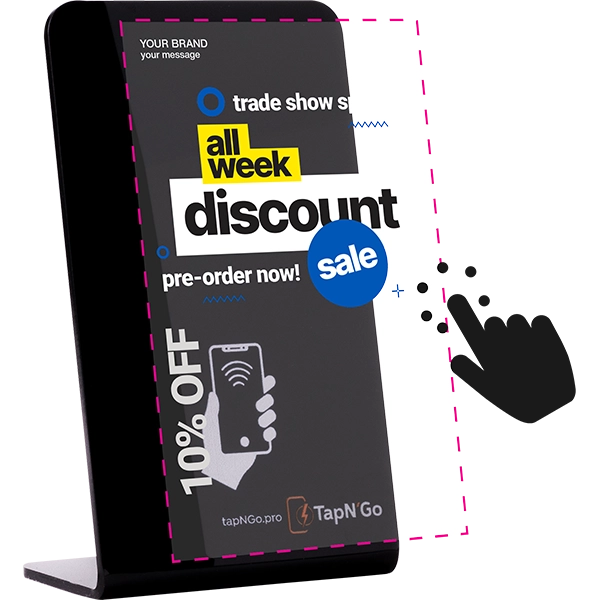
How to Design Your Custom TapN’Go NFC Stand in 3 Easy Steps
Download Our Template
Choose the template format that matches your design software and ensures perfect sizing for your custom TapN’Go NFC stand.

Create Your Stand Artwork
Use your own brand elements, messaging, and call-to-action. Follow the included guides for safe zones and bleed. Use CMYK color mode and 300 DPI resolution for best results. Save as PDF or ZIP (if including linked assets), max 2 MB.
Upload With Your Order
At checkout, choose “I’m Ready to Upload My Design” to send your artwork right away, or select “Buy Now & Upload Later” if you’re not ready yet — we’ll email you a secure upload link after purchase. Either way, your custom TapN’Go NFC stand will be printed exactly to your specifications.
Need a Pro-Designed Stand?
Want professional polish? Choose the Design It For Me option when ordering and our team will craft a stand-ready file from your brand assets. Or — you can just focus on what you’re good at and have us build your full campaign and ship it to your event or office in time to impress and engage.
Try Full-Service Event Campaign